dnsgen
→ View on GitHubAI Summary: DNSGen 2.0 is an advanced DNS name permutation engine tailored for security researchers and penetration testers, facilitating subdomain discovery and security assessments through the generation of intelligent domain name variations. Notable features include a smart domain name permutation engine, support for custom wordlists, multiple sophisticated permutation techniques such as word affixing and cloud-specific patterns, and integration capabilities with tools like MassDNS for efficient domain resolution.
README
DNSGen 2.0 - Advanced DNS Name Permutation Engine 🚀


DNSGen is a powerful and flexible DNS name permutation tool designed for security researchers and penetration testers. It generates intelligent domain name variations to assist in subdomain discovery and security assessments.
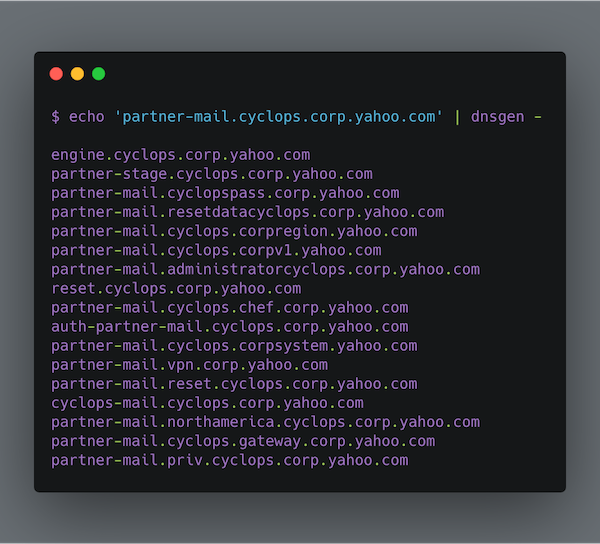
✨ Features
- 🔍 Smart domain name permutation engine
- 🚄 Fast generation mode for quick assessments
- 📝 Support for custom wordlists with comments
- 🎯 Intelligent word extraction from existing domains
- 🔧 Multiple permutation techniques
- 🌍 Cloud-aware patterns and modern naming conventions
🚀 Quick Start
Installation
# Using pip
python -m pip install dnsgen

# Using uv (recommended for development)
git clone https://github.com/AlephNullSK/dnsgen
cd dnsgen/
python -m pip install uv
uv sync
Basic Usage
# Basic domain permutation
dnsgen domains.txt

# With custom wordlist and output file
dnsgen -w custom_wordlist.txt -o results.txt domains.txt

# Using fast mode for quick assessment
dnsgen -f domains.txt

# Pipe with massdns for resolution
cat domains.txt | dnsgen - | massdns -r resolvers.txt -t A -o J --flush 2>/dev/null
🛠️ Permutation Techniques
DNSGen 2.0 implements multiple sophisticated permutation techniques:
Core Permutators
Word Insertion
- Inserts words between domain levels
- Example:
api.example.com→staging.api.example.com
Number Manipulation
- Intelligently modifies existing numbers
- Example:
api2.example.com→api1.example.com,api3.example.com
Word Affixing
- Prepends/appends words to levels
- Example:
api.example.com→devapi.example.com,api-dev.example.com
Cloud & Modern Infrastructure Permutators
Cloud Provider Patterns
- Adds cloud-specific naming patterns
- Example:
example.com→api-aws.example.com,storage-azure.example.com
Region Prefixes
- Adds geographical region patterns
- Example:
api.example.com→us-east.api.example.com
Microservice Patterns
- Generates microservice-style names
- Example:
example.com→auth-service.example.com,user-api.example.com
DevOps & Tooling Permutators
Internal Tooling
- Adds common internal tool subdomains
- Example:
example.com→jenkins.internal.example.com
Port Prefixing
- Adds common port numbers
- Example:
api.example.com→8080.api.example.com
📋 Command Line Options
dnsgen [OPTIONS] FILENAME

Options:
  -l, --wordlen INTEGER  Min length of custom words (default: 6)
  -w, --wordlist PATH    Path to custom wordlist
  -f, --fast            Fast generation mode
  -o, --output PATH     Output file path
  -v, --verbose         Enable verbose logging
  --help               Show this message and exit
🔧 Advanced Usage
Custom Wordlists
DNSGen 2.0 supports commented wordlists for better organization:
# Environment Names
dev
staging
prod

# Cloud Providers
aws
azure
gcp

# Tools and Services
jenkins
gitlab
grafana
Integration with MassDNS
Get clean resolved domains:
# Generate and resolve
dnsgen hosts.txt > wordlist.txt
massdns -r resolvers.txt -o S wordlist.txt | grep -e ' A ' | \
  cut -d 'A' -f 1 | rev | cut -d "." -f1 --complement | \
  rev | sort | uniq > resolved_domains.txt
🤝 Contributing
Contributions are welcome! Here’s how you can help:
- Fork the repository
- Create a feature branch:
git checkout -b feature/amazing-feature - Commit your changes:
git commit -m 'Add amazing feature' - Push to the branch:
git push origin feature/amazing-feature - Open a Pull Request
See CONTRIBUTING.md for more details.
📚 Resources
- Subdomain Enumeration: 2019 Workflow
- Subdomain Enumeration: Doing it a Bit Smarter
- Project Documentation
📜 License
This project is licensed under the MIT License - see the LICENSE file for details.
🙏 Acknowledgments
- Original concept by Aleph Null s.r.o.
- Inspired by altdns
- massdns for DNS resolution
📊 Project Status
- ✅ Core functionality complete
- 🏗️ Adding more permutation techniques
- 📝 Improving documentation
- 🧪 Adding tests
Made with ❤️ by the security community