epicgames-freegames-node
→ View on GitHubAI Summary: EpicGames-FreeGames-Node is an automated tool designed to log into the Epic Games Store and identify available free games efficiently. Its primary use case is to simplify the process of retrieving checkout links for free games across multiple user accounts and can be executed on a scheduled basis. Notable features include support for JSON configuration, multiple notification mechanisms (such as email, Discord, and Telegram), and the ability to handle device code authentication for logging in.
README
Epic Games Store Weekly Free Games
Automatically login and find available free games the Epic Games Store. Sends you a prepopulated checkout link so you can complete the checkout after logging in. Supports multiple accounts, login sessions, and scheduled runs.
Setup
JSON Configuration
The tool can be configured with a combination of JSON and environment variables. The config file supports JSON5 syntax (comments, trailing commas, etc). For each property, the JSON config value takes priority over the respective environment variable value.
For details on each option, its defaults, and environment variable key, see the config documentation site.
The config file is stored in the mounted /usr/app/config volume and can be named config.json or config.json5.
config.json or config.json5
{
  "runOnStartup": true,
  "cronSchedule": "0 0,6,12,18 * * *",
  "logLevel": "info",
  "webPortalConfig": {
    "baseUrl": "https://epic.example.com",
  },
  "accounts": [
    {
      "email": "example@gmail.com",
    },
  ],
  "notifiers": [
    // You may configure as many of any notifier as needed
    // Here are some examples of each type
    {
      "type": "email",
      "smtpHost": "smtp.gmail.com",
      "smtpPort": 587,
      "emailSenderAddress": "hello@gmail.com",
      "emailSenderName": "Epic Games Captchas",
      "emailRecipientAddress": "hello@gmail.com",
      "secure": false,
      "auth": {
          "user": "hello@gmail.com",
          "pass": "abc123",
      },
    },
    {
      "type": "discord",
      "webhookUrl": "https://discord.com/api/webhooks/123456789123456789/A-abcdefghijklmn-abcdefghijklmnopqrst12345678-abcdefghijklmnop123456",
      // Optional list of users or roles to mention
      "mentionedUsers": ["914360712086843432"],
      "mentionedRoles": ["734548250895319070"],
    },
    {
      "type": "telegram",
      // Optional Custom TELEGRAM server URL
      "apiUrl": "https://api.telegram.org",
      "token": "644739147:AAGMPo-Jz3mKRnHRTnrPEDi7jUF1vqNOD5k",
      "chatId": "-987654321",
      "topic": 5,
    },
    {
      "type": "apprise",
      "apiUrl": "http://192.168.1.2:8000",
      "urls": "mailto://user:pass@gmail.com",
    },
    {
      "type": "pushover",
      "token": "a172fyyl9gw99p2xi16tq8hnib48p2",
      "userKey": "uvgidym7l5ggpwu2r8i1oy6diaapll",
    },
    {
      "type": "gotify",
      "apiUrl": "https://gotify.net",
      "token": "SnL-wAvmfo_QT",
    },
    {
      "type": "homeassistant",
      "instance": "https://homeassistant.example.com",
      "token": "eyJhbGciOiJIUzI1NiIsInR5cCI6IkpXVCJ9.eyJzdWIiOiIxMjM0NTY3ODkwIiwibmFtZSI6IkpvaG4gRG9lIiwiaWF0IjoxNTE2MjM5MDIyfQ.SflKxwRJSMeKKF2QT4fwpMeJf36POk6yJV_adQssw5c",
      "notifyservice": "mobile_app_smartphone_name",
    },
    {
      "type": "bark",
      // your bark key
      "key": "xxxxxxxxxxxxxxxxxxxxxx",
      // bark title, optional, default: 'epicgames-freegames'
      "title": "epicgames-freegames",
      // bark group, optional, default: 'epicgames-freegames'
      "group": "epicgames-freegames",
      // bark private service address, optional, default: 'https://api.day.app'
      "apiUrl": "https://api.day.app"
    },
    {
        "type": "ntfy",
        "webhookUrl": "https://ntfy.example.com/mytopic",
        "priority": "urgent",
        "token": "tk_mytoken"
    },
    {
      "type":"webhook",
      //url of your webhook server
      "url":"https://webhook.site/my_uuid",
      //Optional headers
      "headers": {
         "Authentication": "Bearer 123456"
      }
    },
  ],
}
Web server
This project can occasionally ask you to login via device code authentication. Epic Games’s device code session expires after 10 minutes, so this project uses a web server and redirect to prevent from sending you a new link every 10 minutes. There are two options for running the web server:
Web server config
If you’re familiar with hosting web servers and/or reverse proxies, follow this:
- Expose port 3000 in your Docker run config (e.g.
-p 81:3000maps the host machine’s port 81 to the container’s port 3000) - If you want to access the Captcha solving page from outside your network, setup any port forwarding/reverse proxy/DNS
- Set the
webPortalConfig.baseUrlin the config
Localtunnel setup
If you don’t have the ability to port forward/reverse proxy on your network, you can still access the web server remotely by setting:
{
  "webPortalConfig": {
    "localtunnel": true,
  },
}
in your config.json.
Notifications
Each notification method has unique setup instructions. Read its documentation (notification methods) on the config site for exact details and instructions. The example config may also help as an example.
Testing notification and web server
Since user actions may not always be required, the notification methods and web server can be manually tested. Essentially, you just need to add:
"testNotifiers": true,
to the root of your config.json. For more details check out the config docs.
Note: to optimize for standby memory usage, the web server does not run when the process is not running. The web server will only be available during a scheduled run.
Docker Configuration
This image is available from both GitHub Container Registry and Docker Hub:
ghcr.io/claabs/epicgames-freegames-node:latestcharlocharlie/epicgames-freegames:latest
If you’re experiencing issues with Chromium starting (hangs on login/notification), you can try the Debian image:
ghcr.io/claabs/epicgames-freegames-node:debiancharlocharlie/epicgames-freegames:debian
If you are using full JSON configuration, the only remaining Docker configurables are the port and volume.
Environment Variables
Most configuration options can be set via environment variable. Look for the env tag in the config docs for each option’s key.
If for whatever reason you want to change the default config directory or config file name, CONFIG_DIR and CONFIG_FILE_NAME are available as environment variables.
Ports
| Host port | Container port | Description |
|---|---|---|
3000 | 3000 | Port mapping on which the web server hosting the captcha solving page resides |
Volumes
| Host location | Container location | Mode | Description |
|---|---|---|---|
/my/host/dir/ | /usr/app/config | rw | Location of the config and cookie file(s) |
Memory Limit
It’s recommended to add -m 2g as a docker run parameter to set a max memory usage of 2GB. The Chromium processes can sometimes run away, and without a limit your system can eventually lock up.
Docker Run
With JSON Config
$ docker run -d -v /my/host/dir/:/usr/app/config:rw -p 3000:3000 -m 2g ghcr.io/claabs/epicgames-freegames-node:latest
Without JSON Config
Without JSON config, you can only configure one account.
$ docker run -d -e TZ=America/Chicago -e EMAIL=example@gmail.com -e RUN_ON_STARTUP=true -e BASE_URL=https://example.com -e SMTP_HOST=smtp.gmail.com -e SMTP_PORT=587 -e EMAIL_SENDER_ADDRESS=hello@gmail.com -e EMAIL_SENDER_NAME="Epic Games Captchas" -e EMAIL_RECIPIENT_ADDRESS=hello@gmail.com -e SMTP_SECURE=true -e SMTP_USERNAME=hello@gmail.com -e SMTP_PASSWORD=abc123 -v /my/host/dir/:/usr/app/config:rw -p 3000:3000 -m 2g ghcr.io/claabs/epicgames-freegames-node:latest
Cookie Import
If you’re experiencing issues logging in with device code auth, you can import cookies for a temporary session.
- Setup the container per the below instructions
- In your web browser, log in to the Epic Games Store with “Remember me” checked.
- Install the EditThisCookie browser extension.
- While viewing the Epic Games Store page, open the EditThisCookie extension window, change the URL to
https://www.epicgames.com/id, and click the export button: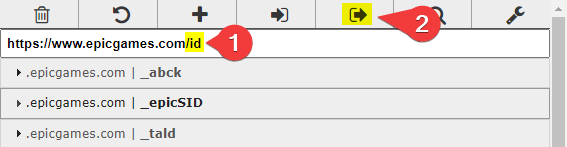
- In your mounted
./configfolder, create<email_address>-cookies.json(e.g.me@example.com-cookies.json), and paste in your cookies. - Start the container and the cookies will automatically be converted to a new format.
Cookie Import Notes
- If you click “Log Out” on the browser session you copied the cookies from, the container may break.
- If you have the container scheduled regularly, it should automatically refresh the cookies and keep you logged in for some time.
Running without Docker
If for some reason you don’t want to use Docker to run this tool you can run it from source by cloning this repo and installing Node.js.
- Get this repo from Github
- Clone using git (recommended):
git clone https://github.com/claabs/epicgames-freegames-node.git - Or download and unpack ZIP archive: epicgames-freegames-node
- Clone using git (recommended):
- Create
configfolder in the cloned/unpacked directory - Create JSON configuration
- Install Node.js 22 or higher
- Install Node.js dependencies
- Start terminal and navigate to cloned/unpacked directory
- Run
npm i
- Start application:
npm run start - To update when using Git:
git pullnpm i
Miscellaneous
v4 to v5 Migration
In v5, several options have been added or removed. The added/removed options should not affect existing v4 configs, but may need to change your config.json for a stable solution.
Changed
cronSchedule: The default was changed to every six hours. You should change your cron schedule to run more often than every 8 hours, as the device code auth refresh token expires after 8 hours.
Removed
account.password: login credentials are no longer usedaccount.totp: login credentials are no longer usednoHumanErrorHelp: purchase is no longer automatedhcaptchaAccessibilityUrl: was deprecated in v4email: was deprecated in v4, usenotifierswith"type": "email"baseUrl: was deprecated in v4, usewebPortalConfig.baseUrlonlyWeekly: was deprecated in v4, usesearchStrategy
Thanks
Thanks to epicgames-weekly-freegames for the inspiration.
Thanks to EpicResearch for the documentation that made device code auth possible.